With 2026 release wave 2, Business Central online can mirror selected companies and tables into a Fabric open mirrored database, landing them in OneLake as Delta Parquet tables that Power BI, SQL, Spark and Fabric IQ can all read directly.
Microsoft announced the capability at FabCon Europe in Barcelona on 29 September 2026. Microsoft Learn describes it as a production-ready preview planned for October 2026, so details may still change before general availability.
Why this matters
If you run your business on Dynamics 365 Business Central, you probably know this moment well. It’s month-end, someone needs a report that combines sales, inventory and finance across all your companies, and suddenly half the team is exporting spreadsheets and stitching them together by hand. Business Central is great at running the day-to-day. Getting its data out for bigger-picture reporting has always been harder than it should be.
That’s finally changing. With the 2026 release wave 2, Microsoft has introduced a built-in way to send your Business Central data straight into Microsoft Fabric, its all-in-one analytics platform. It was announced at FabCon Europe in Barcelona at the end of September 2026, and it’s rolling out now as a preview.
In this post, we’ll walk through what Fabric is, what this new connection actually does, and what it means for the reports and insights your team relies on. No data engineering degree required.
First, what is Microsoft Fabric?
Think of Microsoft Fabric as one big, well-organised home for all of your company’s data. Instead of having your ERP data in one place, your CRM in another and your website numbers in a third, Fabric brings them together so they can be analysed side by side.
At its heart is something called OneLake, a single shared storage space for the whole organization. Everything else in Fabric, from Power BI dashboards to data science tools, reads from that same place. That means fewer copies of the same data floating around, and fewer arguments about whose numbers are right.
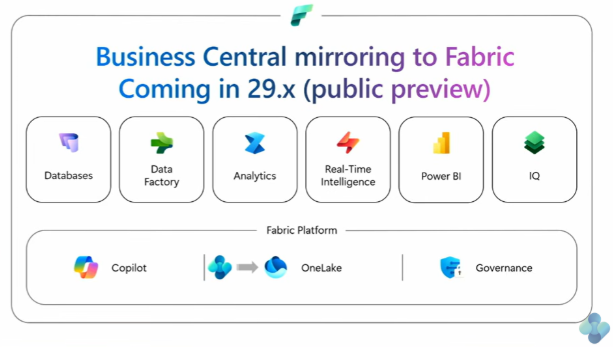
If you already use Power BI, you’re closer to Fabric than you might think. Power BI is part of the Fabric family.
So what actually launched?
The new feature is called data mirroring. The name is a good description: it keeps a live “mirror image” of your Business Central data inside Fabric.
Here’s a simple way to picture it. Imagine your Business Central system is a busy shop floor. Until now, anyone who wanted figures had to walk onto the floor and ask for them, which slowed everyone down. Mirroring is like installing a window into a separate office next door. The analysts can see everything they need, and the shop floor keeps working undisturbed.
A few things make this a big deal:
- It’s built by Microsoft. Before this, getting Business Central data into Fabric meant custom-built connections or third-party tools. Now there’s an official, supported option.
- It stays up to date. After an initial copy, only the changes are sent across, typically every few minutes.
- It doesn’t slow down your ERP. According to Microsoft MVP Stefano Demiliani, who tested it early, mirroring uses its own internal channel, so it doesn’t eat into the limits your other integrations depend on.
- It covers your customizations too. Tables added by extensions can be mirrored alongside the standard ones.
- All your tables are eligible. Any table stored in the database can be mirrored, standard and extension tables alike. That includes your own custom tables and those added by AppSource apps.
- Every field comes along. You choose which tables to mirror, not individual fields, so you always get the complete picture.
- Deletes are handled. When a record is deleted in Business Central, it disappears from the mirror too, so your reports never show data that no longer exists.
- Multi-company by design. You pick which companies to include, and each environment is set up separately.
- Near real time. Updates typically arrive within a few minutes, depending on how busy your data is. So far, no limits on tables, rows or data volume have been found.
How it works
The whole setup comes down to three steps in a line: Business Central sends its data to Fabric, and your team uses it from there.
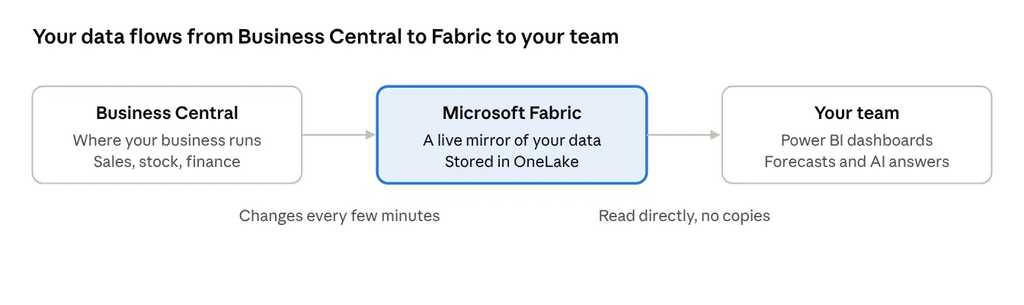
- You choose what to share. In Business Central, an administrator picks which companies and which kinds of data (sales, customers, inventory and so on) should be mirrored.
- Business Central sends a full copy, then just the changes. The first sync copies everything you selected. After that, only new and updated records travel across, so it stays quick.
- Fabric keeps it ready to use. The data is stored in OneLake in an open, analytics-friendly format, ready for Power BI reports, data analysts and AI tools.
Behind the scenes, it’s all managed from a new setup page inside Business Central, where admins can also check that each sync ran smoothly.
What you can do with your data now
This is where it gets exciting. Once your Business Central data is in Fabric, it opens up a lot more than faster reports.
Reports that are always fresh. Power BI can read the mirrored data directly, without waiting for overnight refreshes. Your dashboards stay within minutes of what’s happening in Business Central.
One view across all your companies. If you run several Business Central companies, you can finally see them together in a single report. Microsoft is even rebuilding its nine standard Business Central Power BI apps to run on Fabric, with both single-company and multi-company versions.
Your ERP data, alongside everything else. Want to see how a marketing campaign affected orders, or how supplier delays hit your stock levels? Fabric lets you combine Business Central with data from your CRM, online store or warehouse system.
Smarter forecasting. Years of sales, purchasing and payment history become fuel for forecasting. Think demand planning, cash-flow predictions or spotting customers who are likely to pay late.
Final thoughts
For years, Business Central users have asked a simple question: “How do we get our data out for proper reporting?” Now there’s finally a simple answer.
Mirroring to Microsoft Fabric means less time wrestling with exports and more time understanding your business. It brings your companies together, connects your ERP to the rest of your data, and opens the door to forecasting and AI that used to feel out of reach for growing businesses.
It’s early days, and the preview label is a good reason to start small. But if better reporting has been on your wish list, now is a great time to start exploring.


Leave a Reply